Once you've booked a shipment, there are several ways to print the packing slips, shipping labels and commercial invoices: via a webshop system or MyWuunder. You can create the commercial invoice directly in MyWuunder, or we'll put the content together for you automatically if we receive the required details, such as HS code and country of origin, from your webshop system.
PRINT FROM AN OVERVIEW OF ALL COMMERCIAL INVOICES
- Once you've booked a shipment, you can quickly print all your packing slips, shipping labels and commercial invoices from the Prepare overview in MyWuunder (go to Shipments and select Prepare). Here you'll see all the shipments you've booked successfully that have a packing slip, shipping label or commercial invoice ready to print.
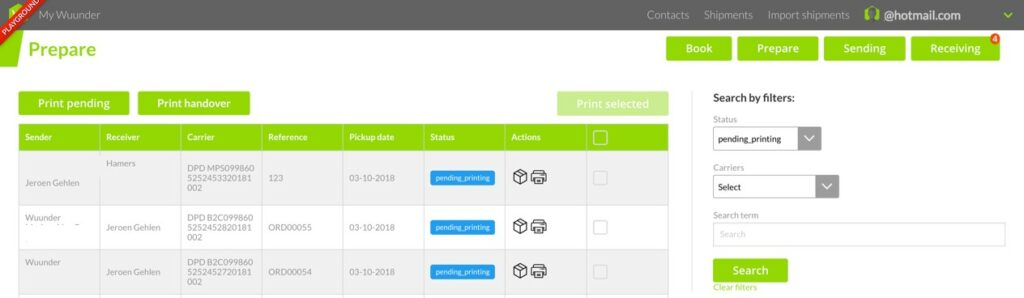
- You can print all (not yet printed) commercial invoices in one go with “Bulk printing”. We'll then print all the commercial invoices you haven't printed before. Of course, you can also print each commercial invoice individually or in groups. Simply select the invoices you want to print and click “Print selected”.
- You can now also add a blue signature to the commercial invoice. This is required for shipments outside the EU. Go to Settings and then Default shipment settings. You'll then see the screen below.
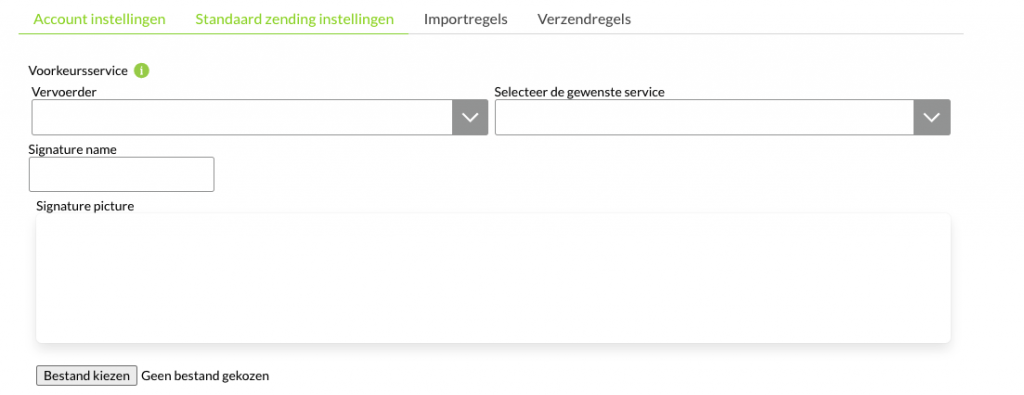
With Signature picture you can easily add a signature. It will then appear automatically on the commercial invoice. - Once all your shipments have a shipping label, it's smart to print a handover list. The driver signs this list to confirm they've received the shipments. If the carrier ever loses a shipment, you'll always have proof that you handed it to the driver. Printing a handover list is very easy. Read more here.
Was this article helpful?
That’s Great!
Thank you for your feedback
Sorry! We couldn't be helpful
Thank you for your feedback
Feedback sent
We appreciate your effort and will try to fix the article