Want to pick a default shipping method, or haven't you recorded the volume and/or weight of every product in your webshop? Wuunder can help you fill in the missing details. It's easy, via the Settings menu in MyWuunder.
We use these default details when you book through a webshop shipping module, one of our APIs, or an order that you book manually or with Bulk booking in MyWuunder. Find out here how they are added during booking.
DEFAULT SETTINGS
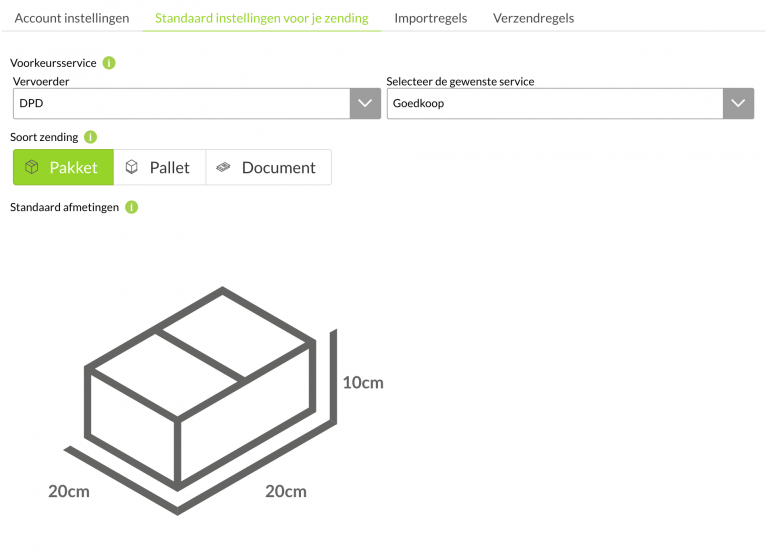
Open the Settings menu in MyWuunder and choose “default settings” so you can book faster with a fixed carrier. For example, if you only ever want the cheapest DPD service, choose “DPD Cheapest”. Is your favourite not listed? Just ask Wuunder's customer service.
Use smart import rules and/or shipping rules if you don't always want to use the same service. That way you can, for example, always use DHL Parcel for Germany, PostNL for letterbox parcels within the Netherlands, or add extra insurance to a valuable shipment. Selecting transport services automatically saves you a lot of time.
USE A DEFAULT VOLUME AND WEIGHT
- Do you almost always send documents, parcels or pallets? Then set that as your default. The driver almost always delivers a document without ringing the bell. Need a signature? Then it's smart to send it as a parcel. Shipments over 30 kg usually need to go on a pallet.
- If your shop doesn't store a volume or weight per item, you can fill in these values by default. If your shop does provide one or more values, we'll of course use those.
- We use the description of the goods on the shipping label if there's no order number. We also use this text in the email to the recipient. Want a standard text here, such as “thank you for your order”? You can add it here.
- The value is only used for specific carriers, such as UPS, for example to insure shipments.
- Want to include your company logo or another picture in the email to your customer by default? You can upload that picture here.
- Always save your changes by selecting “Save”.
ACCOUNT SETTINGS
In MyWuunder you can easily set your language and time zone via the Settings menu. Choose from Dutch, German, French or English. Easy as that!
Was this article helpful?
That’s Great!
Thank you for your feedback
Sorry! We couldn't be helpful
Thank you for your feedback
Feedback sent
We appreciate your effort and will try to fix the article