There are several ways to send a shipment quickly: via the Wuunder browser, a webshop system, an API connection or MyWuunder.
As soon as you send an order to Wuunder via a webshop system, an API connection (if you don't want to receive a label straight away) or MyWuunder, you'll see an overview page with all the details needed to book a shipment. Once you've checked them, click “Request rates”.
TRANSPORT SERVICE SELECTION
1. You'll now see an overview where you decide how you want to send the shipment. You can let Wuunder pick the most suitable carrier for your shipment:
- Cheap: the most affordable way to send the shipment, but often also the slowest.
- Efficient: a solution between cheap and fast.
- Fast: the fastest possible method. Need it even faster? That's possible with a direct courier. Just give us a call.
2. The preferred service shows which service your customer chose at checkout, or the service you sent through an API connection. If no service was chosen in advance, we select the default service you've set up. If you haven't set a default service, we'll preselect the cheapest service.
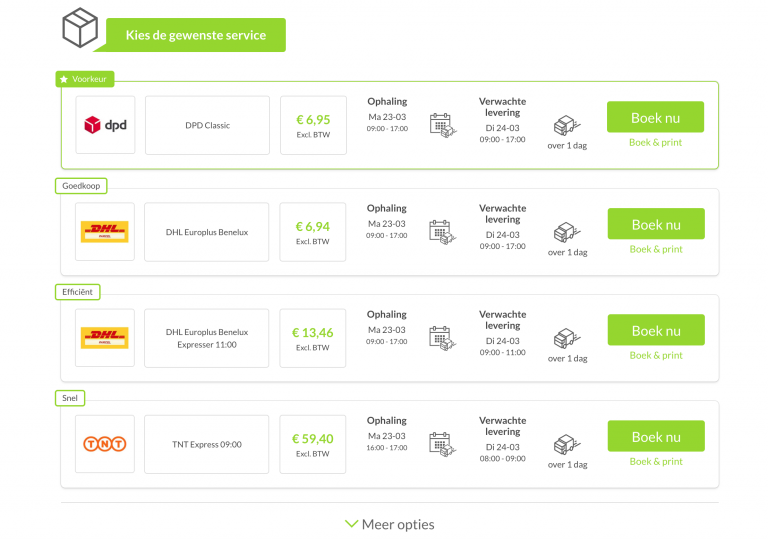
3. There are lots of different ways to send a shipment, and you decide how fast it needs to go.
4. Is a carrier or service missing from the overview? Just let us know here. You can also always click the “Call me back” button, and our team will help you book the shipment. Easy as that!
5. Ask for advice if you want to send a very important shipment that has to arrive by a certain date, or a very valuable one: we're happy to help! Wuunder takes national holidays into account in the delivery day we show. Avoid unpleasant surprises when sending very important shipments and always check with our customer service.
6. As soon as you press ‘Book now’, the shipment is booked and we arrange collection for you if needed. Click ‘Book&Print’ and the shipping label is printed straight away. You'll need the One Click Printing app for this. You'll find more information about using ‘Book&Print’ in Book & Print.
7. Once you've booked the shipment, we take you back to the order page of your webshop or the draft overview in MyWuunder. Here you'll also find more information if booking the shipment failed.
8. Now you can print the shipping label you need via your mobile, browser, webshop or in MyWuunder. In MyWuunder you can also print shipping labels in bulk (several labels in one go) or print labels with a scanner. You'll find all the options for printing shipping labels in Save time printing shipping labels.
Questions? Just get in touch at info@wuunder.com.
Was this article helpful?
That’s Great!
Thank you for your feedback
Sorry! We couldn't be helpful
Thank you for your feedback
Feedback sent
We appreciate your effort and will try to fix the article